

- Tammy Buchanan
- Best Practice Updates
Can you use AI safely in schools?
ChatGPT, Gemini, Copilot and Data Protection
A Practical Guide for School Leaders and Data Protection Officers
Introduction
Generative AI tools such as ChatGPT (OpenAI), Google Gemini and Microsoft Copilot have arrived in schools whether leaders planned for it or not. Research shows that nearly half of teachers in England were already using generative AI by 2024, often without formal policies in place. The DfE's June 2025 policy paper, Generative Artificial Intelligence (AI) in Education, makes the government's position unmistakable: AI, when implemented safely and effectively, can transform education, but safety must come first.
This guide helps school leaders, designated safeguarding leads (DSLs) and data protection leads understand the risks of using these tools with personal and special category data, what UK law requires, and how to put practical safeguards in place. It also covers what to do if something has already gone wrong.
1. Understanding the Tools: What They Are and How They Handle Your Data
The DfE policy paper describes ChatGPT, Microsoft Copilot and Google Gemini as generative AI tools built on large language models (LLMs). They can answer questions, generate text and code, and respond to prompts in a human-like way. Understanding how each tool handles data, and what settings are available, is the essential first step before allowing any use in school.
ChatGPT (OpenAI)
The free and Plus consumer versions of ChatGPT use your prompts to train their models by default. For schools, this is unacceptable as a basis for any use involving personal data. The important distinction is that ChatGPT Enterprise, ChatGPT Edu and API access do not use input data for model training by default.
Safer settings for schools:
• Use ChatGPT Edu or Enterprise where training on user data is disabled by default
• Sign a Data Processing Addendum (DPA) with OpenAI: this establishes OpenAI as a data processor
• Enable data residency in the UK or Europe where available
• Disable chat history and memory features for staff accounts
• Turn off any opt-in to model improvement programmes
• Use Admin controls and Audit Logs to monitor usage
Google Gemini
Consumer versions of Gemini are subject to Google’s standard privacy policy. However, Google Workspace for Education, which many schools already use, offers a more controlled environment. Gemini integrated within Google Workspace for Education is subject to the Workspace for Education terms, under which Google does not use customer data to train its AI models.
Safer settings for schools:
• Access Gemini only through Google Workspace for Education, not personal Google accounts
• Confirm that your Google Workspace for Education agreement includes appropriate data processing terms
• Use the Admin Console to restrict which users can access Gemini features
• Review supplemental terms for any AI features added to Workspace products
• Ensure data is stored in an approved region (UK or EEA)
Microsoft Copilot
Many schools already use Microsoft 365 for Education. Microsoft Copilot accessed through a licensed Microsoft 365 subscription (as opposed to the free consumer Copilot at copilot.microsoft.com) benefits from Microsoft’s enterprise data protection commitments. Microsoft does not use data processed through Microsoft 365 services, including Copilot for Microsoft 365, to train its foundation AI models.
Safer settings for schools:
• Access Copilot only through your school’s Microsoft 365 Education tenancy: not personal Microsoft accounts or the consumer Copilot website
• Confirm your Microsoft Customer Agreement and Data Processing Addendum are in place
• Use Entra ID (Azure AD) for Single Sign-On and conditional access policies
• Configure Microsoft Purview to apply sensitivity labels and data loss prevention (DLP) policies
• Check that your data is stored in UK or European data centres
Claude (Anthropic)
Claude, developed by Anthropic, is an increasingly widely-used generative AI tool, and one that is already in use by many teachers and school staff, often through personal accounts. Understanding how it differs across its tiers is essential, because the data protection position varies significantly between consumer and commercial versions.
The critical consumer/commercial distinction:
In August 2025, Anthropic changed its consumer privacy policy so that users of Claude Free, Pro and Max accounts could have their conversations used to train future AI models if they opted in (or failed to opt out before the October 2025 deadline). This means that staff who have been using Claude on a personal account since that date may have had their conversations, potentially including any personal data they entered, retained for up to five years and used for model training, unless they actively opted out via Settings → Privacy → ‘Help improve Claude.’ This is unacceptable for any use involving personal data about pupils or staff.
Commercial accounts: Claude for Work (Team and Enterprise), Claude for Education, and Claude Gov , are entirely different. Under Anthropic’s commercial terms, data from these accounts is never used for model training, is not subject to the consumer opt-in/opt-out toggle, and is governed by Anthropic’s Data Processing Addendum (DPA), which is automatically incorporated when commercial terms are accepted.
Safer settings for schools:
• Use only Claude for Education or Claude Enterprise, not Claude Free, Pro or Max (consumer tiers). Model training on user data is disabled by default under commercial terms and cannot be toggled on
• Confirm that Anthropic’s DPA is in place. it is automatically incorporated into commercial terms. Standard Contractual Clauses (SCCs) are included in the DPA to cover international data transfers
• Verify data residency: Anthropic’s infrastructure runs on AWS (Amazon Web Services). Confirm with Anthropic’s enterprise team where data will be stored and processed, and whether UK or EU region options are available for your contract
• For the most sensitive use cases, ask Anthropic about Zero Data Retention (ZDR) mode, which is available for Enterprise customers and ensures data is not stored beyond immediate processing
• Use SSO and admin controls available in Enterprise plans to manage staff access centrally
• Audit which staff have been accessing Claude via personal consumer accounts and assess whether any personal data may have been entered during the period when training opt-in was in effect (from October 2025 onwards for those who did not opt out)
|
📋 Claude via Microsoft 365 Copilot: A Separate Route From April 2026, Anthropic became a subprocessor within Microsoft 365 Copilot, meaning Claude models may be used to power some Copilot features. Importantly, in the UK (and the EU and EFTA), Anthropic models within Microsoft 365 Copilot are set to Off by default, schools must actively enable them via the Microsoft 365 Admin Centre. Where Claude is accessed through Microsoft 365 rather than directly via Anthropic, the Microsoft Product Terms and Microsoft Data Protection Addendum govern the processing, not Anthropic’s separate commercial terms. Schools using this route should ensure they understand which AI model is processing a given request and which contractual framework applies. |
|
⚠️ Critical Reminder The DfE policy paper states explicitly: “It is recommended that personal data is not used in generative AI tools.” If it is strictly necessary, the school must ensure all steps are taken to protect the data and that products and procedures comply with data protection legislation. This means using free or consumer versions of any of these tools for anything involving personal data is not acceptable. |
2. Understanding the Risks
The NCSC’s February 2024 guidance, AI and Cyber Security: What You Need to Know, reminds organisations that AI introduces risks which are not always obvious to non-technical managers. The DfE echoes this: schools must evaluate benefits and risks before any use and safety should not be compromised.
Data Privacy Risks
• Training data exposure. In consumer AI products, prompts may be used to train future model versions. Any personal data entered could be reproduced in responses to other users.
• Data residency and international transfers. All three tools are operated by US companies. Without specific contractual arrangements and data residency controls, pupil and staff data may be processed and stored outside the UK, creating UK GDPR compliance risks under the rules on international data transfers.
• Shadow IT. Staff using personal accounts or free versions of AI tools outside school systems, where no data processing agreement exists, represents one of the most common and serious risks in schools today.
• Unauthorised disclosure. A member of staff pasting pupil names, SEND information, behaviour records or safeguarding notes into an AI tool without appropriate controls constitutes a data breach under UK GDPR.
Cyber Security Risks
The NCSC warns of prompt injection attacks, where malicious instructions embedded in documents or web content manipulate an AI into taking unintended actions or disclosing sensitive data. The NCSC notes these are particularly concerning when LLMs are used as autonomous agents with access to school systems. The DfE also highlights that generative AI “could be used to increase the sophistication and credibility of [phishing] attacks” targeting schools.
Content and Safeguarding Risks
The DfE policy paper notes that AI-generated content could be inaccurate, biased, inappropriate or unsafe, and could be taken out of context. KCSIE 2025 now explicitly references AI within its online safety provisions, requiring schools to consider AI use in their safeguarding policies. Schools must refer to the DfE’s Generative AI Product Safety Expectations when selecting any tool for pupil-facing use.
3. The Legal Framework: UK Data Protection Law
Using AI tools with any personal data engages UK data protection law. Schools must understand which laws apply and what they require.
|
Legislation |
Relevance to AI use in schools |
|
UK GDPR |
Requires a lawful basis for all personal data processing, transparency, data minimisation, purpose limitation, security and accountability. Applies whenever personal data is entered into an AI prompt. |
|
Data Protection Act 2018 |
Supplements UK GDPR in England. Includes specific provisions for children’s data. Schools must appoint a DPO and maintain records of processing. |
|
Data (Use and Access) Act 2025 |
Received Royal Assent on 19 June 2025. The majority of core data protection provisions (Part 5) came into force on 5 February 2026 via the Commencement No. 6 Regulations. Key changes relevant to schools: (1) introduces “Recognised Legitimate Interests” as a new Article 6 lawful basis for five defined purposes including safeguarding vulnerable people and crime prevention: no Legitimate Interests Assessment required, but Article 9 special category obligations still apply in full; (2) significantly expands the scope for lawful Automated Decision-Making (ADM) for non-sensitive data, while retaining the previous prohibition on solely automated significant decisions involving special category data; (3) online services likely to be accessed by children must take account of “children’s higher protection matters.” ICO is publishing updated guidance throughout 2026, schools and DPOs should monitor the ICO website closely. |
|
ICO Children’s Code (Age Appropriate Design Code) |
Applies to online services likely to be accessed by children. AI tools used with pupils may engage this Code. Schools must ensure any pupil-facing AI meets its requirements, including high privacy settings by default and data minimisation. |
Special Category Data: The Highest Risk Category
Special category data under UK GDPR includes health and medical information (including SEND needs and mental health), racial or ethnic origin, religious or philosophical beliefs, and data concerning sex life or sexual orientation. For schools, records about pupils’ educational, health, and welfare needs frequently constitute special category data.
Processing special category data requires not only a lawful basis under Article 6 of UK GDPR, but an additional condition under Article 9. In most school contexts, the relevant conditions will be explicit consent (difficult to rely on for routine processing), substantial public interest, or legal obligation. The ICO has noted that the use of special category data in the context of AI, including when it appears in datasets used to train or prompt models, is an area of particular regulatory focus.
A note on ‘Recognised Legitimate Interests’ (DUAA 2025): The Data (Use and Access) Act 2025 introduced a new Article 6 lawful basis called “Recognised Legitimate Interests,” which covers five defined purposes: crime prevention, safeguarding vulnerable people, responding to emergencies, safeguarding national security, and assisting bodies delivering public interest tasks sanctioned by law. For these specific purposes, organisations do not need to carry out a Legitimate Interests Assessment (LIA). Data Protection Leads should note two important limits. First, Recognised Legitimate Interests does not apply to special category data, Article 9 conditions must still be satisfied separately whenever sensitive pupil data such as health, SEND, or behaviour records are involved. Second, Recognised Legitimate Interests cannot be used as the lawful basis for automated decision-making (ADM), that is an explicit exclusion in the Act. It is therefore not a general licence to process sensitive pupil data through AI tools, and it does not remove the need for a DPIA where processing is high-risk.
|
🛑 Special Category Data and AI: The Key Rule Do not enter special category data into any AI tool, including enterprise or Edu tiers, without a documented lawful basis under both Article 6 and Article 9 of UK GDPR, a completed Data Protection Impact Assessment (DPIA), a signed Data Processing Agreement with the provider, and appropriate technical safeguards. In most school use cases, this effectively means special category data should not be entered into consumer AI tools at all. Even in controlled enterprise environments, schools should minimise and pseudonymise before any such use is considered. |
Data Protection Impact Assessments (DPIAs)
The ICO requires a DPIA before using AI for high-risk processing activities. In schools, this includes any use of AI with children’s personal data, any automated decision-making about pupils, and any processing of special category data. The DfE’s Digital Standards confirm that DPIA requirements are embedded throughout the updated standards. A DPIA must: identify the processing and its purpose; assess necessity and proportionality; identify and mitigate risks; and be reviewed regularly.
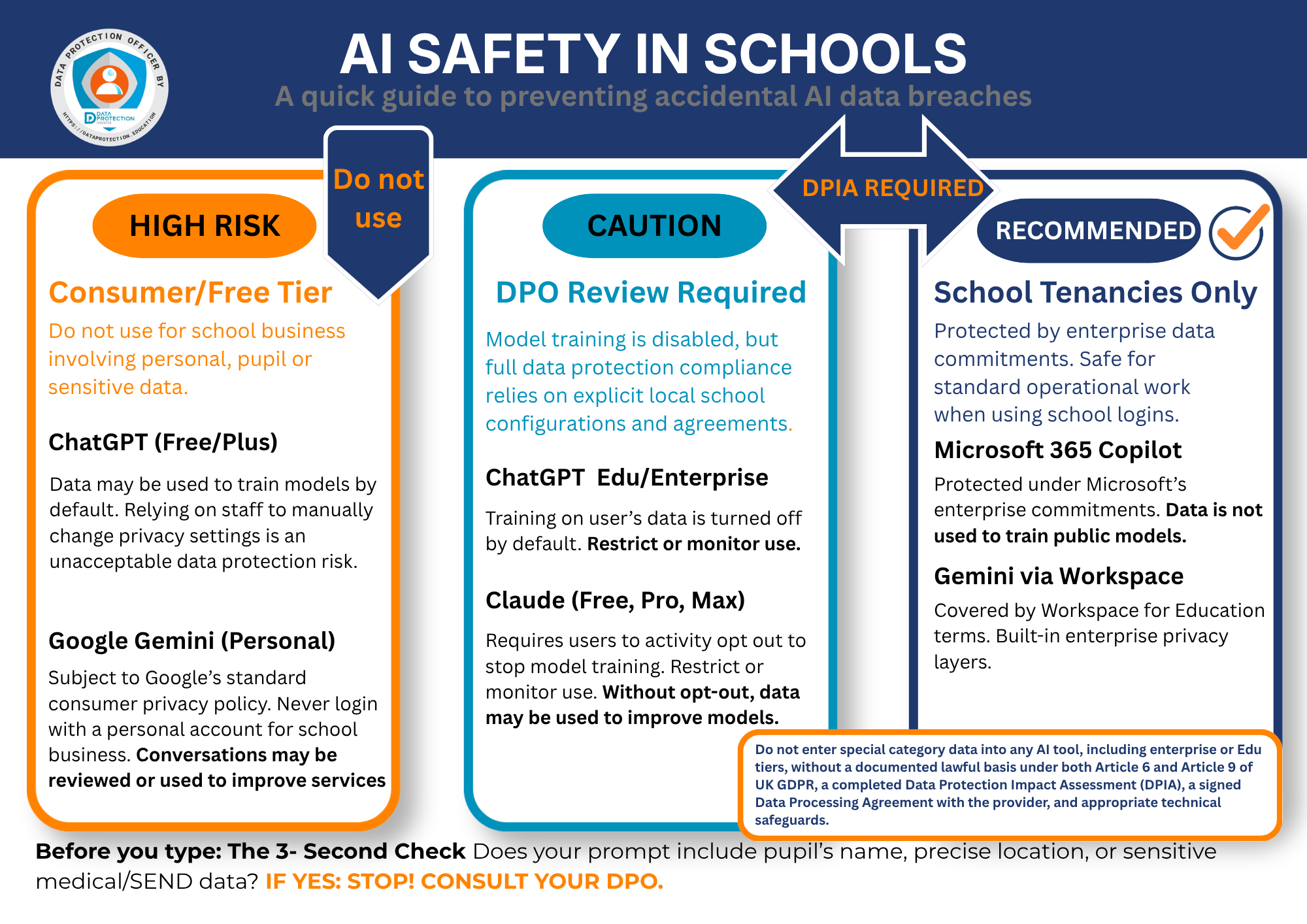
Download this infographic:
4. DfE Digital Standards: What Schools Must Have in Place
The DfE has published 12 digital standards in total covering technology infrastructure, security, and governance for schools and colleges in England. Of these, six have been designated as “core standards” that all schools must meet by 2030, backed by DfE infrastructure investment. Regularly updated, all 12 are relevant to the safe use of AI tools. Cyber security is explicitly identified as a shared responsibility between senior leadership and IT teams, not solely an IT function.
The Six Core Standards Mandated for 2030
These are the standards that form the DfE’s headline commitment, supported by targeted funding programmes such as Connect the Classroom:
• Cyber Security Standards: Schools must conduct an annual cyber risk assessment, implement Cyber Essentials controls (multi-factor authentication, device management, patch management, access control), and have an incident response plan. The DfE explicitly requires that cyber incident reporting includes the NCSC, ICO and the DfE sector team (
• Filtering and Monitoring Standards: Schools must have filtering and monitoring systems that cover generative AI tools. The DfE AI policy paper cross-references these standards directly, noting that schools should ensure their filtering approach “covers generative AI.”
• Digital Leadership and Governance Standards: Governing bodies must take responsibility for digital strategy. Senior leaders must appoint an SLT digital lead. The digital strategy must incorporate AI use and associated risk management.
• Broadband Internet: Schools must have fast, reliable, full-fibre broadband. Robust connectivity is a prerequisite for safe cloud-based and AI-driven learning, and for ensuring that security systems, such as filtering and monitoring, function reliably.
• Wireless Networks: A modern, managed wireless network (Wi-Fi 7 or equivalent) is required to handle increasing traffic loads from cloud tools and AI applications, and to enforce device-level access controls.
• Network Switching: Compliant network switches provide the underlying infrastructure to segment traffic, enforce security policies, and support the performance demands of cloud-hosted AI services.
Wider DfE Standards Relevant to AI (Outside the Core 6)
Beyond the six core standards, the DfE’s wider set of 12 standards includes requirements that are particularly significant for schools using cloud-hosted AI tools:
• Cloud Solutions Standards: While not one of the six core 2030 infrastructure standards, the DfE’s Cloud Solutions standard directly governs the use of cloud-based services, which includes all three of the AI tools covered in this guide. It sets requirements for managing access, availability, data protection and backups. Schools must understand where data is stored, ensure it is encrypted, and verify that cloud AI providers meet these requirements through their data processing agreements.
• Acceptable Use Policies (AUPs): The DfE Cyber Security Standards require all staff, pupils, governors and visitors to sign an AUP. This must be reviewed annually and must now explicitly address AI tool use.
5. Can Schools Safely Use AI with Special Category Data?
The short answer is: only in very specific, carefully controlled circumstances, and never via consumer AI tools. The DfE policy paper is unambiguous: “Personal data must be protected in accordance with data protection legislation. It is recommended that personal data is not used in generative AI tools.”
However, the DfE acknowledges that there may be use cases where it is “strictly necessary.” If a school genuinely needs to use AI with data that may constitute special category data, the following conditions must all be met:
1. Lawful basis documented: Both a standard Article 6 basis and an Article 9 special category condition must be identified and recorded in the school’s Record of Processing Activities (ROPA).
2. DPIA completed: A full DPIA must be completed before processing begins. For high-risk or novel processing involving children’s sensitive data, the ICO recommends consulting them before proceeding.
3. Data Processing Agreement (DPA) signed: A formal DPA with the AI provider must be in place. This is possible with ChatGPT Enterprise, Microsoft 365 Copilot and Google Workspace for Education, but not with free consumer versions.
4. Enterprise or Edu tier only: Only tools where data is not used for model training and where data residency can be confirmed in the UK or EEA should be used.
5. Pseudonymisation and data minimisation: Before any data enters an AI prompt, remove or replace direct identifiers. Use initials or reference codes rather than names where possible.
6. Transparency and data subject rights: The DfE policy paper requires schools to “ensure the data subjects (pupils and parents or legal guardians) understand that their personal data is being processed using AI tools” and to “seek agreement to use data in an AI tool.”
7. Staff training: Only trained staff with clear instructions should handle any such processing.
|
✅ Likely Lower-Risk Uses (with appropriate controls) • Using anonymised, aggregated pupil attainment data (no names or identifiers) to generate resource ideas • Drafting administrative text (letters, communications) without including personal data in the prompt • Lesson planning, resource creation and professional development that does not involve pupil data • Staff using enterprise tools to analyse their own generic workload data |
|
⚠️ High-Risk Uses: Do Not Do Without Full DPIA and DPA • Entering named pupil data alongside SEND, health or welfare information into any AI prompt • Using AI to summarise or draft reports involving safeguarding information • Asking AI to analyse or recommend provision for named children with identified needs • Using consumer-grade AI tools (free ChatGPT, personal Google accounts) for any personal data • Using AI as the sole basis for consequential decisions about pupils, such as predicted grades, set placements, or behavioural sanctions, without documented human review. Important context: the DUAA 2025 significantly expands the lawful scope for Automated Decision-Making (ADM) on non-sensitive data, allowing any lawful basis (except Recognised Legitimate Interests) to be relied upon. However, the previous restriction on solely automated significant decisions involving special category data is retained. This means that any AI-driven decision drawing on a pupil’s health, SEND, or other special category data still requires either explicit consent or a substantial public interest basis, plus meaningful human intervention at each stage. Schools must build documented human-in-the-loop overrides into any AI-assisted decision-making process that affects pupils significantly, and must be able to demonstrate that human review is substantive, not a rubber-stamp. |
6. What to Do if You Don’t Have Safety Procedures in Place and What Has Already Happened
Many schools are in the position of having staff who are already using AI tools, without formal policies, DPIAs or data processing agreements in place. At DPE we are now regularly seeing tickets logs with data breaches from AI misuse. If this is your school, the following steps should be taken urgently, ideally in consultation with your DPO.
Immediate Steps: Triage and Contain
8. Audit current AI use. Ask staff to self-report which AI tools they are using and for what purposes. Use this to establish whether personal data has been processed without appropriate controls.
9. Suspend unsanctioned use. Issue an immediate communication to all staff confirming which AI tools are not approved for use with personal data. This should be in writing and recorded.
10. Assess what data has been shared. Identify, as specifically as possible, what types of personal or special category data may have been entered into AI tools, and by how many people.
11. Consult your DPO. Your Data Protection Officer must be involved immediately. If you do not have a dedicated DPO, contact your local authority, trust or an external DPO service. This is a legal requirement under UK GDPR for schools.
Assessing Whether a Data Breach Has Occurred
Under UK GDPR, entering personal data into an AI tool without a lawful basis, without a data processing agreement, or in a way that leads to unauthorised disclosure, constitutes a personal data breach. The ICO defines a personal data breach as “a breach of security leading to the accidental or unlawful destruction, loss, alteration, unauthorised disclosure of, or access to, personal data.”
The consequences in school contexts that are likely to trigger mandatory reporting include: entering a child’s SEND or health information into a consumer AI tool; entering safeguarding records or child protection information; entering staff health or other special category data; or any scenario where data may have been incorporated into model training.
|
Timeframe |
Required Action |
|
Immediately |
Contain the breach: stop the activity, suspend any accounts or access involved, preserve evidence. |
|
Within hours |
Notify your DPO and headteacher/principal. Begin documenting: what happened, when, what data was involved, how many individuals affected. |
|
Within 72 hours |
If the breach is likely to result in a risk to individuals’ rights and freedoms, your DPO will notify the ICO. |
|
Without undue delay |
If the breach poses a high risk to individuals, particularly where special category data or children’s data is involved, you must also notify the affected individuals (pupils, parents/carers, staff) in clear, plain language. DPE customers should consult with our core DPO team. |
|
Always |
Record the breach in your breach log, even if you decide it is not notifiable. Include what happened, the risk assessment you conducted, and actions taken. This is a legal requirement under UK GDPR. |
Additional reporting:
• Report serious cyber incidents to the NCSC
• Report cyber crime to Report Fraud (0300 123 2040)
• Contact the DfE’s sector cyber team:
• If you are an academy trust, notify your DfE contact
Building Back Better: After the Immediate Response
- Complete DPIAs for any ongoing or planned AI use.
- Put data processing agreements in place with any AI provider the school uses.
- Update or create an AI Acceptable Use Policy for staff and pupils.
- Update the ROPA to include AI tool use.
- Add AI security to your annual cyber risk assessment, in line with the DfE Cyber Security Standards.
7. Making Staff Aware: Training and Communication
The DfE published a free suite of five staff training modules on 10 June 2025, (updated May 2026) developed in partnership with the Chiltern Learning Trust and the Chartered College of Teaching. These are the government’s own recommended training resources and should form the backbone of any school’s AI awareness programme. They are available at gov.uk/government/collections/using-ai-in-education-settings-support-materials and include activity-focused slides, videos with transcripts, multiple-choice assessments, and planning templates that can be adapted for individual or group use.
|
Module |
What it covers |
Who should complete it |
|
Module 1: Understanding AI |
What AI is, how it works, and the importance of using AI alongside teacher expertise to unlock more meaningful time with pupils |
All staff, especially those new to AI |
|
Module 2: Interacting with Generative AI |
How to interact effectively with AI tools; prompting skills and practical techniques |
All staff beginning to use AI tools |
|
⚠️ Module 3: Safe Use of Generative AI REQUIRED FOR ALL |
The main risks: safeguarding, ethics, data protection, intellectual property and how to mitigate against them. The DfE recommends everyone completes this module regardless of experience level. |
ALL staff: mandatory |
|
Module 4: Use Cases |
Practical examples of how generative AI can be used across different education contexts |
All staff, to build confidence in practical application |
|
Leadership Module: Using AI in Education |
Opportunities; safety requirements; auditing current AI use; planning for AI use; embedding AI into the school’s wider digital strategy |
Headteachers, SLT, governors, subject leads and middle leaders |
The Chartered College of Teaching has also provided complementary materials via chartered.college including a free online AI journal, case studies of schools using AI safely, and a free multiple-choice assessment with Chartered College certification based on the training materials.
Recommended Staff Awareness Approach
1. Start with leadership.
Governing bodies must understand their legal responsibilities. The DfE’s Leadership Module,which includes guidance on auditing current AI use and embedding AI into the school’s digital strategy, is the recommended starting point for headteachers and SLT. A governing body briefing should cover the DfE’s AI policy, the school’s current risk position, and the plan for safe use.
2. All-staff: Module 3 first.
The DfE is explicit that Module 3, Safe Use of Generative AI, should be completed by everyone, regardless of experience, before or alongside any active AI use. Before any AI tool is introduced (or as an emergency measure if use is already widespread), all staff need clear written communication covering: which tools are approved; what data must never be entered; what to do if unsure; and how to report a concern. Completion of Module 3 should be recorded and signatures or acknowledgements obtained.
3. Build on with Modules 1, 2 and 4.
Once Module 3 is complete, staff can work through the remaining modules at their own pace or in structured CPD sessions. The materials can be adapted for individual use or facilitated group sessions. Role-specific considerations to layer on top:
• Class teachers: Modules 1–4 in full, with particular focus on Module 4 use cases. Practical guidance on what counts as personal data in a classroom context.
• SENCOs and pastoral staff: Specific reinforcement from Module 3 on data risks, with clear worked examples of what is and is not acceptable for SEND and welfare data.
• Admin and office staff: Focus on Module 3 data protection content, applied to admissions data, HR data, and financial data.
• IT and data leads: Technical training on configuring enterprise AI tools securely, managing DPAs, and monitoring for shadow IT use.
4. Regular updates.
AI tools and the guidance around them are evolving rapidly. Build AI data protection awareness into your annual induction cycle, your regular GDPR refreshers, and your safeguarding training. The DfE, ICO and NCSC are all updating their guidance regularly: assign someone to monitor and cascade updates.
Section 8: Common DPO Helpdesk Tickets and Data Breaches
The following table summarises the most frequently raised tickets to the core DPO team and reported data breaches regarding AI tool use. Each scenario is assessed for severity, ICO notification obligation, and mitigations. This section is intended to support data protection leads in providing rapid, consistent advice and to inform staff training priorities.
|
CRITICAL |
Special category data or safeguarding records processed without controls. High likelihood of ICO notification and individual harm. |
HIGH |
Personal data breach with potential for harm; notification assessment required; strong likelihood of being notifiable. |
MODERATE |
Breach or risk of breach; notification depends on content. May not be notifiable for low-sensitivity data, but must be logged. |
ADVISORY |
Preventive query: no breach has yet occurred. Respond with clear guidance to prevent one. |
|
⚠️ Important: Version Matters For ChatGPT and Claude in particular, the data handling position is fundamentally different between consumer tiers (Free, Pro, Max) and commercial/education tiers (Enterprise, Edu, for Education). A question that cannot be answered without first knowing which version was used should always prompt the data protection lead to ask: “Which account or plan was being used, and was it a personal or school account?” |
|
# |
Breach/Ticket Scenario |
Tool |
Severity |
ICO Notification? |
Immediate Actions |
Longer-Term Mitigations |
|
T1 |
Staff member used ChatGPT to analyse student and staff data including payroll numbers and salaries |
ChatGPT (consumer / unspecified tier) |
CRITICAL |
Likely notifiable to ICO within 72 hrs |
• Establish immediately which version was used (free/Pro = consumer; Team/Enterprise = commercial). If consumer, a reportable breach is almost certainly triggered. • Identify exactly what data was entered: full names, payroll numbers, salary data: all personal data; salary data may also be special category in some contexts. • Notify the DPO and headteacher/principal within hours. Begin the breach log. • Contact OpenAI to report the incident and request data deletion where possible (note: this may not be effective for consumer accounts where data has entered training pipelines). • Assess whether affected staff have a right to be notified , likely yes for salary/payroll data. • Preserve evidence: screenshots, account details, date and time of access. |
• Confirm or procure ChatGPT Edu / Enterprise with a signed DPA before any further use. • Issue an immediate all-staff written instruction prohibiting use of consumer AI for personal data. • Review and update the Acceptable Use Policy to explicitly name payroll and HR data. • Add this scenario to mandatory staff training: real examples are the most effective deterrent. • Conduct a DPIA for any ongoing or planned AI use involving HR or financial data. |
|
T2 |
Staff member used ChatGPT to refine a child's Education, Health and Care Plan (EHCP) |
ChatGPT (consumer / unspecified tier) |
CRITICAL |
Likely notifiable to ICO within 72 hrs |
• EHCP content is special category data under UK GDPR (health, disability, educational needs). This is one of the highest-risk breaches a school can experience. • Identify the version used. Consumer ChatGPT: almost certain notifiable breach. Even Enterprise requires a DPA and DPIA to process EHCPs. • Notify DPO and headteacher immediately. DPE will advise. Commence breach log and 72-hour ICO clock. • Notify the child's parents/carers without undue delay: EHCP data is highly sensitive. • Notify the Local Authority SEND team: they are joint data controllers for EHCPs. • Request data deletion from OpenAI; note limitations for consumer accounts. • Consider whether the EHCP itself needs to be reviewed or reissued given the breach. |
• Implement a blanket policy: EHCP content must never be entered into any AI tool without explicit DPO sign-off, a completed DPIA, and an active DPA with the provider. • Brief all SENCOs and pastoral staff on the legal status of EHCP data: it is among the most protected categories under UK GDPR. • Review whether any other SEND documents (SEND Support Plans, Provision Maps) have been entered into AI tools. • Update DfE Digital Standards compliance documentation to reflect this risk in the school's cyber risk assessment. |
|
T3 |
Staff member updated CPOMS (safeguarding system) after running their safeguarding statement through ChatGPT |
ChatGPT (consumer / unspecified tier) |
CRITICAL |
Likely notifiable to ICO; consider referral to safeguarding lead and possibly LADO |
• Safeguarding records are special category data and may also be subject to legal professional privilege or child protection procedures. This is a critical-severity breach. • Identify the version used. Consumer ChatGPT = reportable breach. Even enterprise tools cannot be used for safeguarding records without a full DPIA and DPA. • Notify the DPO and DSL (Designated Safeguarding Lead) immediately — this is both a data protection and a safeguarding issue. • Notify the headteacher and consider whether the LADO (Local Authority Designated Officer) needs to be informed if the breach relates to an allegation. • Notify the ICO within 72 hours where the breach involves identifiable safeguarding information about a child. • Assess whether the CPOMS record itself may have been compromised or needs amendment. |
• Issue an absolute prohibition: safeguarding records, child protection notes, and CPOMS entries must never be processed through any AI tool. • Update DSL and DDSL training to include AI data risks as part of the safeguarding training cycle. • Review KCSIE compliance: the school's safeguarding policy should now explicitly address AI use. • Consider whether CPOMS and similar systems should be explicitly listed as restricted systems in the AUP. |
|
T4 |
Teacher used an AI tool to transcribe a handwritten register of students |
Unspecified AI tool |
MODERATE |
Assess: low-risk names only = likely not notifiable; additional details = review |
• Identify which AI tool was used and whether it was a consumer or commercial version. • Establish what the register contained: names only (lower risk) vs. names with attendance codes, medical notes, or other personal data (higher risk). • If a consumer tool was used, log the breach and contact DPE to assess whether it is notifiable, for a simple list of names only, the risk to individuals may be low, but it is still a breach of UK GDPR (no lawful basis, no DPA). • Notify DPO so the breach log can be updated even if the incident is not notifiable to the ICO. |
• Clarify to all staff that pupil names constitute personal data and cannot be processed through consumer AI tools. • If transcription of handwritten documents is a genuine need, evaluate approved tools: Microsoft 365 with Copilot (via school tenancy) includes OCR and transcription features under the school's existing DPA. • Update the AUP to give concrete examples of what counts as personal data in everyday tasks (registers, mark books, seating plans). • Consider a DPIA if transcription of pupil documents is to become an approved workflow. |
|
T5 |
Microsoft Copilot was used to transcribe a Teams meeting and the transcript was accessible to students |
Microsoft Copilot (via Teams) |
HIGH |
Likely notifiable if transcript contained staff or pupil personal data; assess content |
• Establish immediately what the Teams meeting transcript contained: if it included personal data about staff or pupils, this is a breach of UK GDPR (unauthorised disclosure to students). • Revoke student access to the transcript immediately and confirm it is no longer accessible. • Identify how many students had access and for how long. • If personal data about staff (e.g. appraisal discussions, HR matters) or pupils (e.g. SEND, behaviour) was disclosed to students, notify the DPO and commence the ICO 72-hour assessment. • If the meeting contained safeguarding information, treat as high-priority and notify the DSL. |
• Copilot meeting transcription is a powerful feature but requires deliberate configuration: ensure transcripts are stored in appropriate SharePoint/Teams locations with access controls limiting visibility to participants only, not wider student-accessible channels. • Create a staff guidance note specifically on Copilot transcription: which meetings may/may not be transcribed; where transcripts are stored; who has access. • Use Microsoft Purview sensitivity labels to automatically restrict transcripts containing certain content types. • Review Microsoft 365 tenancy settings to ensure student accounts cannot access staff-only SharePoint sites or Teams channels where transcripts are stored. • Add Copilot transcription to the AUP and staff training materials. |
|
T6 |
Can images of children be uploaded to Claude to create a leavers' PowerPoint? |
Claude (Anthropic) |
HIGH RISK if consumer / NOT APPROVED |
Preventive question, no breach yet; advise before proceeding |
• Do not proceed using a consumer Claude account (Free, Pro, Max). Images of children are biometric-adjacent personal data; uploading to a consumer AI tool without a DPA constitutes a breach. • Since October 2025, consumer Claude accounts may use uploaded data for training, images of identifiable children must not be uploaded. • This is a preventive query: respond promptly with clear guidance before the action is taken. |
• If the school has Claude for Education or Claude Enterprise with a signed DPA and has confirmed data residency: uploading a small number of pupil images for a clearly defined purpose (e.g. leavers' presentation) may be permissible, but requires: (1) a documented lawful basis (legitimate interests with a LIA, or consent), (2) parental/carer awareness, (3) the images being deleted from the AI session promptly, and (4) the output reviewed before sharing. • A safer alternative: use Microsoft PowerPoint Designer (available within the school's M365 tenancy) or Canva for Education — both support image-based presentation creation under existing DPAs and without the additional risk of uploading pupil images to a generative AI model. • Update staff guidance to explicitly address pupil photographs as personal data in the context of AI tools. • If this workflow is to be approved, complete a DPIA specifically covering the use of pupil images in AI presentation tools. |
|
T7 |
Can Gemini be used to summarise a document? |
Google Gemini (version unspecified) |
DEPENDS ON VERSION AND CONTENT |
Preventive question — advise before proceeding; no breach yet |
• This is a preventive query — the right response is clear, tiered guidance rather than a blanket yes or no. • Key question 1: Which Gemini? Consumer Gemini (gemini.google.com via personal account) = not approved for personal data. Google Workspace Gemini (via the school's Google Workspace for Education tenancy) = permissible with appropriate controls. • Key question 2: What is in the document? A document containing pupil names, SEND data, safeguarding information, or staff personal data requires a higher level of caution regardless of version. |
• APPROVED with controls: Gemini via Google Workspace for Education, staff access their school Google account and use Gemini from within Workspace apps (Docs, Drive, etc.). Google's Workspace for Education terms confirm data is not used to train AI models. A DPA is in place. This is the supported route. • NOT APPROVED: Gemini via a personal Google account, even for apparently innocuous documents, no DPA, no data residency controls. • For documents containing personal data: instruct staff to remove or redact names and identifiers before summarising where possible (data minimisation). • For documents containing special category data (SEND, health, safeguarding): advise staff to refer to the DPO before proceeding, even within Workspace for Education. • Publish a one-page staff guide: 'How to use Gemini safely', which account to use, what to check before uploading a document, what types of document cannot be summarised via any AI tool without DPO approval. |
Notes for Data Protection Leads
72-hour clock: The 72 hours runs from when the school became aware, not when the investigation is complete. Let us know so we can report to the ICO with what you know and update the report as information is gathered. Non-DPE customers, report at: ico.org.uk/for-organisations/report-a-breach
Breach log: Every breach in this table, even where the ICO notification threshold is not met, must be recorded in the school’s breach log. This is a legal requirement under UK GDPR Article 33(5). It is also best practice to log near misses so that the need for training can be highlighted
Special category data: EHCPs, CPOMS/safeguarding records, health and disability information, and data about children’s behavioural and pastoral needs are all likely to constitute special category data. The default position must be: this data does not go into any AI tool without DPO sign-off, a completed DPIA, and an active DPA with the provider.
Consumer vs. commercial versions: ChatGPT Free/Pro/Plus and Claude Free/Pro/Max are consumer products with no automatic DPA. Since October 2025, consumer Claude accounts may use conversations for model training if the user opted in (or did not opt out). Schools must audit and stop this use.
Proportionality: Not every incident carries the same weight. A register of first names processed through an approved enterprise tool is a very different matter from EHCP or safeguarding data entered into a consumer AI. Severity ratings here are indicative: data protection leads should share as much information as possible with us so the core DPO team can assess each case on its specific facts.
9. A Quick Check:
AI TOOL CONFIGURATION
|
☐ |
We use only enterprise or education-tier AI tools (not consumer/free versions) for anything involving personal data |
|
☐ |
Training on our data has been disabled in all AI tools used by school staff |
|
☐ |
Chat history and memory features have been reviewed and disabled where appropriate |
|
☐ |
We access Copilot via our school’s Microsoft 365 tenancy (not copilot.microsoft.com) |
|
☐ |
We access Gemini only via Google Workspace for Education (not personal Google accounts) |
|
☐ |
We have confirmed that no staff are using Claude Free, Pro or Max (consumer tiers) for work involving personal data, critical since Anthropic’s training opt-in took effect from October 2025 |
|
☐ |
Where staff use Claude, they access it only via Claude for Education, Claude Enterprise, or the Anthropic API under commercial terms (DPA automatically incorporated) |
|
☐ |
We have confirmed data residency arrangements with Anthropic’s enterprise team and understand that Anthropic’s infrastructure runs on AWS (data transfer safeguards must be verified) |
SPECIAL CATEGORY AND CHILDREN’S DATA
|
☐ |
Staff have been clearly told not to enter SEND, health, welfare or safeguarding data into AI tools |
|
☐ |
Any use of special category data in AI tools has been reviewed by the DPO and has a documented lawful basis |
|
☐ |
Pseudonymisation and data minimisation procedures are in place before any pupil data is used |
|
☐ |
We have considered how AI use interacts with the ICO Children’s Code for any pupil-facing tools |
STAFF AWARENESS AND TRAINING
|
☐ |
All staff have completed DfE Module 3: Safe Use of Generative AI in Education (recommended for everyone regardless of experience) |
|
☐ |
School/college leaders and governors have worked through the DfE Leadership Module: Using AI in Education |
|
☐ |
All staff have received briefing on the school’s AI acceptable use policy |
|
☐ |
Staff have signed or acknowledged the AUP (recorded and updated annually) |
|
☐ |
Role-specific training has been provided for SENCOs, admin staff and class teachers (using DfE Modules 1, 2 and 4 as appropriate) |
|
☐ |
Staff know how to report a concern or suspected data breach |
|
☐ |
AI data protection training is included in induction for new staff |
|
☐ |
We have a mechanism to record staff completion of AI safety training (e.g. via the Chartered College of Teaching’s certification assessment) |
BREACH MANAGEMENT
|
☐ |
We have a written data breach response procedure |
|
☐ |
Our Data Protection Lead knows the 72-hour ICO reporting requirement and has the ICO breach reporting URL |
|
☐ |
We maintain a breach log (required even for non-notifiable breaches) |
|
☐ |
We have assessed whether existing AI use by staff constitutes a historical data breach requiring ICO notification |
10. Conclusion
Generative AI tools offer genuine opportunities for schools to reduce workload and improve resources. The DfE is unambiguous that schools should engage with AI rather than ignore it. But the DfE is equally clear that “safety should be the top priority.” For school leaders and data protection leads, this means that unlocking those opportunities requires getting the foundations right first: the right tools, correctly configured; the right legal framework; informed and trained staff; and robust procedures if something goes wrong.
The good news is that the tools to do this safely exist. Microsoft 365 Copilot, Google Gemini via Workspace for Education, ChatGPT Edu and Enterprise, and Claude for Education and Enterprise all offer data protection controls that make compliant use possible. The key is ensuring these are the versions your school uses, that the configuration has been checked and documented, and that all staff understand the boundaries. Where Claude is concerned, an additional step is needed: confirming that no staff are accessing it via consumer accounts, which have materially different data handling terms since October 2025.
If you are behind on this, start today: speak to your IT Support or data protection lead, issue a clear communication to staff, and work through the checklist in this guide. The risks of doing nothing are real, both in terms of data protection law and in terms of your duty to protect the children and families in your school community. Review your DPIA's with your DPO.
Key References and Further Reading
Department for Education
• Generative Artificial Intelligence (AI) in Education (Policy Paper, last updated 12 August 2025): gov.uk/government/publications/generative-artificial-intelligence-in-education
• Generative AI: Product Safety Expectations (January 2025): gov.uk/government/publications/generative-ai-product-safety-expectations
• Using AI in Education Settings: Support Materials, full collection (10 June 2025): gov.uk/government/collections/using-ai-in-education-settings-support-materials
◦ Module 1: Understanding AI in Education: gov.uk/government/publications/understanding-ai-in-education-module-1
◦ Module 2: Interacting with Generative AI in Education: gov.uk/government/publications/interacting-with-generative-ai-in-education-module-2
◦ Module 3: Safe Use of Generative AI in Education: gov.uk/government/publications/safe-use-of-generative-ai-in-education-module-3
◦ Module 4: Use Cases of Generative AI in Education: gov.uk/government/publications/use-cases-of-generative-ai-in-education-module-4
◦ Leadership Module: Using AI in Education, Support for School and College Leaders: gov.uk/government/publications/using-ai-in-education-support-for-school-and-college-leaders
• Meeting Digital and Technology Standards in Schools and Colleges (updated May 2024): gov.uk/guidance/meeting-digital-and-technology-standards-in-schools-and-colleges
• Data Protection in Schools: gov.uk/guidance/data-protection-in-schools
Information Commissioner’s Office (ICO)
• Guidance on AI and Data Protection: ico.org.uk/for-organisations/uk-gdpr-guidance-and-resources/artificial-intelligence
• Children and the UK GDPR: ico.org.uk/for-organisations/uk-gdpr-guidance-and-resources/childrens-information
• Report a Personal Data Breach: ico.org.uk/for-organisations/report-a-breach/personal-data-breach
National Cyber Security Centre (NCSC)
• AI and Cyber Security: What You Need to Know (February 2024): ncsc.gov.uk/guidance/ai-and-cyber-security-what-you-need-to-know
• ChatGPT and Large Language Models: What’s the Risk?: ncsc.gov.uk/blog-post/chatgpt-and-large-language-models-whats-the-risk
Legislation
• UK GDPR (retained EU law version of the EU GDPR, as amended by the Data Protection Act 2018)
• Data Protection Act 2018
• Data (Use and Access) Act 2025 (Royal Assent 19 June 2025; majority of Part 5 data protection provisions in force 5 February 2026 via Commencement No. 6 Regulations; complaints handling provisions expected June 2026)
• Keeping Children Safe in Education 2025 (statutory guidance)